

Your Google Business Profile determines whether local customers find your business or scroll past to a competitor—yet most business owners claim their listing and never touch it again. That single oversight costs them phone calls, direction requests, and walk-in customers every single day.
This guide walks you through the exact optimization steps that improve your local search rankings, from choosing the right categories and writing keyword-rich descriptions to leveraging AI-powered search features and tracking the metrics that matter.
In 2026, your Google Business Profile is your business's front door. This episode explores Austin Code Monkey’s guide to turning it into a customer magnet: NAP consistency, category selection, review engagement, and weekly posts that boost "near me" visibility on Google Maps. Learn why it's a smarter ROI than paid ads. Full strategy at https://austincodemonkey.com/.
What Is Google Business Profile Optimization
Google Business Profile optimization is the process of improving your free business listing on Google to increase visibility in local search results and Google Maps. When someone searches for a business like yours, Google decides which listings to show based on how complete your profile is, how accurate your information appears, and how often customers engage with your listing. The difference between an optimized profile and a neglected one often determines whether customers find you or your competitor first.
Think of your Google Business Profile as your digital storefront. Just like a physical store with clear signage, clean windows, and accurate hours attracts more customers, a well-optimized profile with complete information, quality photos, and recent reviews draws more local searchers. Unlike traditional SEO that focuses on ranking your website in search results, Google Business Profile optimization specifically targets local searches where customers look for businesses “near me” or in a specific city like Austin.
Why Google Listing Optimization Drives Local Customers
Google uses three main factors to rank local businesses: relevance, distance, and prominence. Relevance measures how well your profile matches what someone searches for, distance considers how close you are to the searcher, and prominence reflects how well-known your business appears based on reviews and online information. While you can’t change your physical location, you can dramatically improve relevance and prominence through optimization.
Here’s what an optimized profile delivers:
- Map pack visibility: Your business appears in the top three local results that show up with the map
- Direct contact options: Customers can call you or get directions without visiting your website
- Qualified traffic: People who find you through Google Business Profile already know what you offer
- 24/7 presence: Your profile works around the clock, even when you’re closed
Most small businesses barely touch their profiles after claiming them, which creates an easy opportunity to stand out.
What an Optimized Google Business Profile Looks Like
An optimized profile signals credibility the moment someone sees it. You’ll notice a verified checkmark next to the business name, complete hours including holidays, and a professional cover photo that accurately represents the business. Recent customer reviews appear with thoughtful responses from the owner, regular posts share updates or promotions, and detailed service descriptions include prices when relevant.
Photos fill the profile—not just one or two generic images, but genuine pictures of the storefront, interior, team members, and actual work. When someone lands on an optimized profile, they can immediately answer three questions: What does this business do? Can I trust them? How do I contact them right now?
Step-By-Step Guide to Optimize Google My Business
1. Claim and Verify the Listing
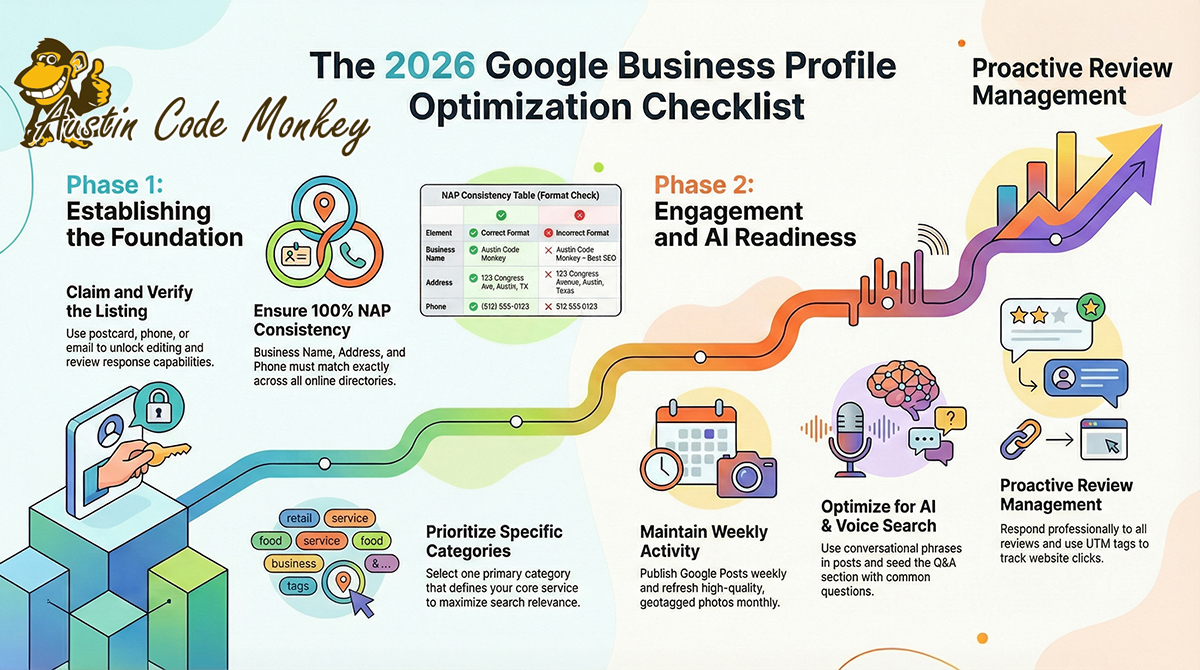
Claiming your Google Business Profile establishes you as the rightful owner and unlocks editing capabilities. Google offers several verification methods, including postcard (a code mailed to your address), phone, email, or instant verification if you’ve already verified through Google Search Console. The postcard method typically takes 5-7 days, while other methods can happen instantly.
Without verification, you can’t edit your profile, respond to reviews, or see how customers find you. If your business already has a listing that someone else created, you’ll need to claim it first.
2. Complete Core Business Information
Your business name, address, and phone number form the foundation of your profile. These three elements need to match exactly across your website, social media, and other online directories. Even small differences like “Street” versus “St.” can confuse Google’s algorithm.
| Element | Correct Format | Incorrect Format |
|---|---|---|
| Business Name | Austin Code Monkey | Austin Code Monkey – Best SEO |
| Address | 123 Congress Ave, Austin, TX 78701 | 123 Congress Avenue, Austin, Texas |
| Phone | (512) 555-0123 | 512.555.0123 |
Your business hours reflect actual operating times, including special hours for holidays or temporary changes. Adding keywords to your business name might seem smart, but Google’s guidelines prohibit this practice and can result in suspension.
3. Choose the Right Primary and Secondary Categories
Your primary category tells Google what your business fundamentally does and determines which searches trigger your listing. Choose the most specific category that describes your main service—for example, “SEO Agency” rather than the broader “Marketing Agency” if search optimization is your primary focus. You can add up to nine secondary categories for additional services, but only select ones that genuinely represent what you offer.
A restaurant selecting “Bar” as their primary category will show up for people searching for drinks but might miss diners looking for food. Categories directly affect visibility, so accuracy matters more than breadth.
4. Write a Keyword-Rich Business Description
Your 750-character business description offers space to explain what makes your business unique while naturally incorporating keywords customers use when searching. Focus on services you offer, areas you serve, and what differentiates you from competitors. For example, “Austin Code Monkey helps local Austin businesses improve their online visibility through local SEO, web design, and digital marketing strategies that drive measurable results” communicates value while including relevant search terms.
Generic descriptions like “We’re the best in town” or “Quality service since 2010” waste space without providing useful information. Instead, answer the question every potential customer has: What can you do for me?
5. Add High-Quality Photos and Videos
Visual content makes profiles more likely to receive direction requests and generate website clicks. Google recommends uploading at least one photo in each category: logo, cover photo, exterior, interior, team, and products or services in action. Photos work best when they’re well-lit, in focus, and at least 720 pixels wide by 540 pixels tall.
Upload photos that show your business in operation rather than stock images. Customers want to see the real dining room, the actual team they’ll work with, or genuine examples of completed projects. New photos signal an active business to Google’s algorithm, so adding fresh images monthly keeps your profile current.
6. Publish Google Posts Weekly
Google Posts appear directly in your Business Profile and provide opportunities to share updates, promotions, events, or helpful content. Posts remain visible for seven days (or until the event date), making them perfect for time-sensitive announcements. Each post can include up to 1,500 characters, photos, and a call-to-action button linking to your website or a specific offer.
Regular posting signals to Google that your business stays active and engaged, which can positively influence rankings. Even simple posts about new services, customer success stories, or helpful tips demonstrate active management.
7. Collect and Respond to Reviews
Customer reviews represent one of the most influential ranking factors for local search while simultaneously affecting whether potential customers choose your business. Google’s algorithm considers both review quantity and quality, with recent reviews carrying more weight than older ones.
Responding to reviews demonstrates that you value customer feedback:
- Thank reviewers: Acknowledge positive feedback with genuine appreciation rather than generic responses
- Address concerns: Respond professionally to negative reviews by acknowledging the issue and offering solutions
- Stay consistent: Maintain a regular response pattern rather than only replying to negative reviews
Never ask customers to change or delete negative reviews, as this violates Google’s policies.
8. List Products, Services, and Menus
The Products and Services sections allow you to create detailed listings with descriptions, prices, and photos for individual offerings. Each service listing provides another opportunity to incorporate relevant keywords while helping customers understand exactly what you provide. For restaurants, the menu feature lets you upload your full menu with prices.
Detailed service descriptions answer customer questions before they ask, reducing friction in the decision-making process. When someone can see exactly what you offer and how much it costs, they’re more likely to contact you already knowing they want what you provide.
9. Enable Messaging and Call History
The messaging feature allows customers to text your business directly from your Google Business Profile, creating a low-friction way for people to ask questions. Call history tracking shows you how many people called from your listing, providing valuable data about which days and times generate the most inquiries. Both features demonstrate to Google that customers actively engage with your business.
Quick responses to messages (ideally within 24 hours) improve customer experience and show potential customers that you’re responsive and professional.
10. Use UTM Tags to Track Clicks
UTM parameters are short text codes you add to URLs that help Google Analytics identify where website traffic originates. By adding UTM tags to the website URL in your Google Business Profile, you can see exactly how many visitors came from your listing versus other sources.
A simple UTM-tagged URL might look like: austincodemonkey.com?utm_source=google&utm_medium=organic&utm_campaign=gbp. Most businesses skip this step and miss valuable data about their profile’s performance.
11. Monitor and Answer Q&A
The Questions & Answers section appears on your profile and allows anyone—potential customers or even competitors—to post questions. If you don’t actively manage this section, you might find inaccurate or unhelpful answers from random people. The solution is to seed your own Q&A by posting common questions customers ask and providing detailed, keyword-rich answers.
This section offers another opportunity to address customer concerns, incorporate relevant keywords, and control the narrative about your business. Check the Q&A section weekly and respond promptly to new questions.
12. Check for Duplicate or Spam Listings
Duplicate listings occur when multiple Google Business Profiles exist for the same business, often created by previous owners, marketing agencies, or Google’s automated systems. These duplicates confuse customers, dilute your reviews across multiple profiles, and hurt your rankings. Search for your business name and location to identify duplicates, then report them through Google’s support system.
Spam listings from competitors can also appear near your business location with similar names. Report these immediately, as they can steal customers and damage your reputation.
13. Repeat Audits Every Quarter
Google Business Profile optimization isn’t a one-time task but an ongoing process. Google frequently updates features, competitors improve their listings, and customer expectations evolve. Schedule quarterly audits to review your profile’s completeness, update photos, refresh your description, and verify all information remains accurate.
Google Business Profile Best Practices for Ongoing Success
Optimize Holiday Hours and Special Hours
Customers trust businesses that provide accurate information, and nothing damages that trust faster than showing up to a closed business on a holiday. Google allows you to set special hours for holidays, temporary closures, or seasonal schedule changes. Update these at least two weeks in advance to give Google time to reflect the changes across all platforms.
Keep NAP Consistent Across Citations
Citations are online mentions of your business name, address, and phone number on other websites like Yelp, Yellow Pages, or industry directories. Google cross-references your Business Profile information with these citations to verify your business’s legitimacy. Inconsistent information—like different phone numbers or address variations—creates confusion and can hurt your local search rankings.
Refresh Visuals With Seasonal Images
Seasonal photos keep your profile feeling current and give you reasons to upload new images regularly. A restaurant might share photos of seasonal menu items, while a retail store could showcase holiday decorations or new inventory. Even service-based businesses can find seasonal angles—tax preparation offices during tax season, landscapers showing spring plantings, or HVAC companies highlighting summer cooling services.
Leverage Attributes for Accessibility and Payments
Attributes are specific features of your business like “wheelchair accessible,” “free Wi-Fi,” “outdoor seating,” or “accepts cryptocurrency.” Google displays relevant attributes prominently in your profile, and customers can filter search results based on attributes that matter to them. Select all accurate attributes for your business, but never claim attributes you don’t offer—customers will notice and leave negative reviews.
Advanced GMB Optimization for AI and Voice Search
Seed Questions for SGE Snapshots
Google’s Search Generative Experience (SGE) uses AI to create summary answers at the top of search results, pulling information from various sources including Google Business Profiles. To increase your chances of appearing in these AI-generated summaries, anticipate common customer questions and answer them thoroughly in your business description, posts, and Q&A section.
Austin Code Monkey helps Austin businesses prepare for AI-driven search through comprehensive content strategies that align with how AI systems interpret and present information.
Add Conversational Phrases to Posts
Voice search queries tend to be longer and more conversational than typed searches—people say “Where can I find a good Italian restaurant open now near me?” rather than typing “Italian restaurant Austin.” Incorporate natural speech patterns into your Google Posts and business description. Instead of writing “SEO services available,” try “We help Austin businesses get found on Google when customers search for services like yours.”
Use Schema on Site to Reinforce GBP Data
Schema markup is code you add to your website that helps search engines understand your business information. LocalBusiness schema includes fields for your business name, address, phone, hours, and services—essentially reinforcing the same information in your Google Business Profile. When Google sees consistent information across your profile and website schema, it increases confidence in your data accuracy.
Geotag Media for Near-Me Searches
Geotagging adds location data to photos and videos, telling Google exactly where the image was taken. When you upload geotagged photos to your Google Business Profile, it provides additional verification that the images genuinely represent your business location. Most smartphones automatically geotag photos, but you can verify this setting is enabled in your camera app before taking pictures of your business.
Metrics That Prove Google My Business SEO Optimization Works
Track Calls Direction Requests and Website Clicks
Google Business Profile Insights provides free data about how customers interact with your listing. The three most important metrics are phone calls (how many people called directly from your profile), direction requests (how many people clicked for driving directions), and website clicks (how many visited your website from your profile).
Track these metrics monthly and look for upward trends after implementing optimization changes. A sudden drop might indicate a problem with your listing that needs immediate attention.
Compare Pre and Post Optimization Impressions
Impressions measure how many times your Business Profile appeared in search results or maps, regardless of whether someone clicked. Tracking impressions over time shows whether your optimization efforts are increasing visibility. Establish a baseline by recording your average monthly impressions before making changes, then compare subsequent months to measure improvement.
Set Up Goals in GA4 for GBP Traffic
Google Analytics 4 (GA4) allows you to set up goals or conversions that track specific actions visitors take on your website. By creating goals for actions like form submissions, phone calls, or purchases, you can see how many conversions come specifically from Google Business Profile traffic (identified by your UTM tags).
When to Use Google My Business Optimization Services
Red Flags Your Listing Needs Professional Help
Most business owners can handle basic Google Business Profile optimization themselves, but certain situations call for professional expertise:
- Suspended or unverified listings: Google suspensions require specific knowledge of guidelines and appeals processes
- Multiple location management: Coordinating optimization across 3+ locations becomes complex and time-consuming
- Competitors consistently outranking despite effort: Sometimes the issue isn’t what you’re doing but what you’re not seeing
What to Expect From a GBP Optimization Service
Professional Google Business Profile optimization typically includes a comprehensive audit of your current listing, competitor analysis, complete profile setup and optimization, ongoing content creation (posts and photos), review management, and monthly reporting on performance metrics. Most agencies provide initial results within 30-60 days, with continued improvement over 3-6 months as optimization efforts compound.
Cost Versus ROI Compared to Ads
Google Ads can generate immediate visibility but stop the moment you stop paying, while an optimized Google Business Profile continues working around the clock without ongoing costs. A typical local Google Ads campaign might cost $1,000-3,000 monthly, while professional Google Business Profile optimization might cost $500-1,500 as a one-time investment or $200-500 monthly for ongoing management.
Ready to Grow With Austin Code Monkey
Google Business Profile optimization offers one of the highest returns on investment for local businesses, combining free tools with proven strategies that drive real customers through your door. Austin Code Monkey specializes in helping Austin businesses maximize their local search visibility through comprehensive Google Business Profile optimization, local SEO strategies, and ongoing digital marketing support. Contact us for a free SEO consultation to discover how we can help your business stand out in local search results.
FAQs About Google Business Profile Optimization
Question: How does artificial intelligence affect google business profile rankings?
Answer: AI helps Google better understand user intent and business relevance by analyzing patterns in how customers interact with listings, making complete and accurate information more important than ever for ranking success. Google’s AI can now recognize when profiles provide genuinely helpful information versus keyword-stuffed descriptions.
Question: How often should businesses post new photos or updates to their google business profile?
Answer: Post new content weekly through Google Posts and refresh photos monthly to signal an active business to Google’s algorithm, though consistency matters more than exact frequency. Even simple updates like sharing a customer testimonial or highlighting a team member demonstrate ongoing engagement.
Question: Can business owners optimize multiple locations from one google my business account?
Answer: Yes, Google My Business allows management of multiple locations through a single dashboard using the bulk management features, though each location needs individual optimization attention tailored to its specific market and customer base.
Question: Is changing business categories frequently harmful to Google Business Profile optimization?
Answer: Frequent category changes can confuse Google’s understanding of your business and hurt rankings as the algorithm struggles to determine which searches trigger your listing, so choose carefully based on your primary service. If you realize you selected the wrong category initially, correct it once rather than maintaining an inaccurate category indefinitely.
Professional SEO Services in Austin, TX
Phone: (737) 932-7532
Website: https://austincodemonkey.com/
Hours: Monday – Friday, 10:00 AM – 10:00 PM
Serving Austin, Round Rock, Cedar Park, Pflugerville, Georgetown, Leander, and the entire Greater Austin metropolitan area with expert search engine optimization, digital marketing, and online visibility solutions.