TL;DR: In late October 2026, Google started emailing some businesses to say it is automatically adding Facebook Messenger links to their Google Business Profiles. Those messages land in your Facebook Page inbox, not anywhere in Google, so a customer can reach out from your listing and wait in an inbox nobody checks. Search your own business while signed out once a month and test every contact button on it.
What changed on Google Business Profiles in October 2026?
Google is automatically adding Facebook Messenger (m.me) links to some Google Business Profiles, and it is telling owners by email after the fact.
Search Engine Roundtable reported this on October 28, 2026, based on a Google email that a business owner shared on X. Google hasn’t put out a broad announcement, and nobody outside Google knows how many profiles are affected. The email itself is the notice. If you missed it, the link may already be live on your listing.
It isn’t the only change. Earlier in October, Search Engine Roundtable also spotted WhatsApp buttons showing up in local panels, and Google moved the Posts section higher on the panel. Some businesses turning on messaging are now being asked for an Employer Identification Number (EIN) and a link to a public privacy policy before chat goes live.
Google has started automatically inserting Facebook Messenger links into select Google Business Profiles. This episode explores the risk of missing important client messages in neglected Meta inboxes and why business owners must now treat every communication channel as a critical sales pathway.
Why does a Messenger link on your Google listing matter?
A Messenger link on your Google listing sends customer messages to your Facebook Page inbox, which a lot of local businesses haven’t opened in months.
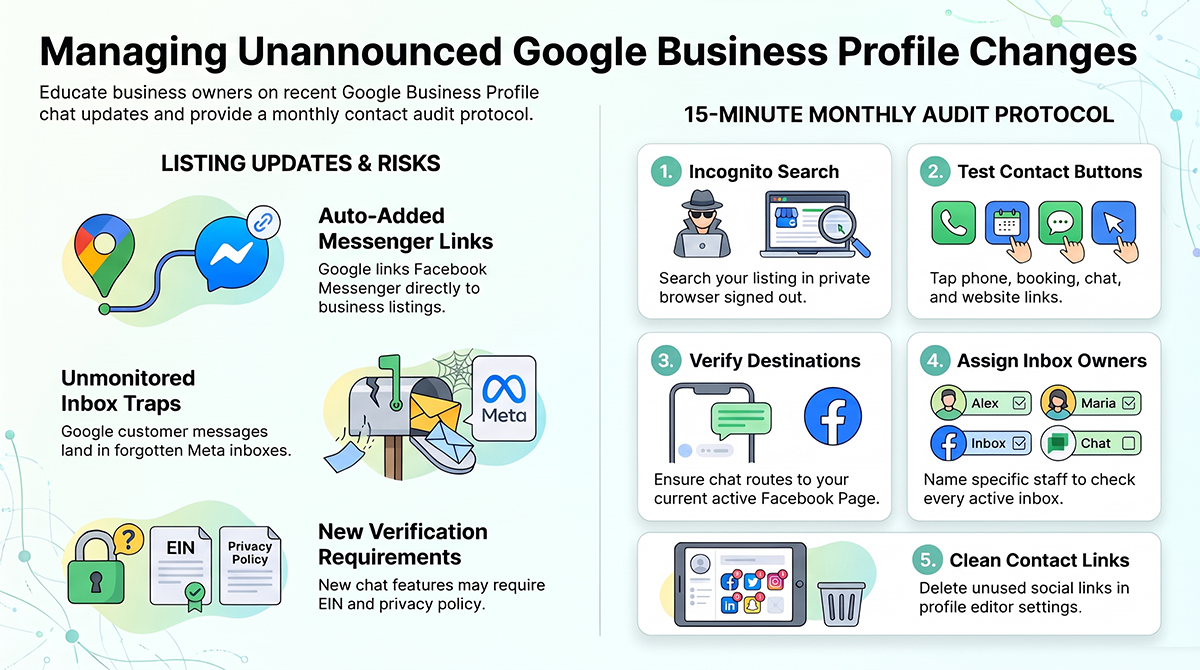
This is the part that gets missed. The customer is on Google. They tap the chat option. The conversation opens in Messenger, and the message lands in a Meta inbox. If the office manager only watches the phone and the email, that lead just sits there.
There’s some history here too. Google shut down its own chat feature, Google Business Messages, on July 31, 2024. Plenty of owners took that as “chat on Google is over” and stopped thinking about it. Now chat is coming back, routed through Meta’s apps instead of Google’s.
Who decides what shows up on your listing?
You don’t fully control your Google Business Profile, and October made that obvious.
Owners tend to think of the profile as something they built and maintain. In practice, it’s closer to a shared document. You supply some of it, customers suggest edits, and Google adds things from its own data. Google has also taken things away. It removed the native Q&A feature from profiles in late 2025, and businesses that had loaded up useful answers there lost that real estate overnight.
The Messenger links are the same pattern going the other direction. Google decided your listing should have one more way to reach you, and it didn’t wait for you to opt in.
Here’s my take: your contact buttons are now a routing table
Every button on your Google listing is a route to a person, and you need to know where each route ends.
Ten years ago, a listing had a phone number and a website. Now it can have a call button, a website link, a booking link, social profiles, a Messenger link, a WhatsApp button, and whatever Google tests next week. Each one sends a customer to a different place. Some of those places get checked every hour. Some get checked never.
Most local businesses I talk to can’t tell you every contact route on their own listing. That’s the actual risk. A lead can now arrive somewhere nobody is assigned to watch, and you’d never know it happened.
The 15-minute monthly listing check
A monthly signed-out check of your own Google listing catches most of these surprises before they cost you a customer.
- Search your business while signed out. Use a private browser window and your phone. What you see in the editor isn’t always what customers see.
- Tap every contact button. Call, website, booking, chat, Messenger, WhatsApp. Write down where each one actually goes.
- Check the Messenger destination. It should open a chat with your current Facebook Page, not an old Page, a personal profile, or an error.
- Assign an owner for every inbox. If a route stays live, a named person checks it on a set schedule. If nobody will, remove it.
- Review your Contact section in the editor. Go to Edit profile, then Contact, and look at social profiles and chat options. Remove links you don’t want. If Google added one you can’t delete, contact support through the Help option in your profile and note the link and the date you saw it.
What about Google Business Home?
Google Business Home is a new closed beta that puts your Business Profile, Merchant Center, YouTube, and Ads accounts in one dashboard, and it’s a sign that more of your listing will be managed with Google’s suggestions built in.
Google calls it a growth partner built with Gemini models, and it’s in testing in the U.S. and U.K. Screenshots show sections for posts, reviews, performance reports, and a brand kit. Nobody knows yet whether it replaces the current profile editor. It’s worth watching, because AI-generated suggestions for your listing are one more source of changes you didn’t write yourself.
What this means for your business
If your business depends on calls and messages from Google Maps, your listing needs an owner who checks it on a schedule, before something breaks.
That’s the thinking behind how we run local SEO at Austin Code Monkey. When Google pulled native Q&A in late 2025, we moved those answers into FAQPage schema on our own site so they lived somewhere Google couldn’t switch off. We run a 20-week Google post calendar and treat each listing as something to audit, not something set once. If you want someone to go through your listing and tell you where every button actually sends people, that’s part of our local SEO and Google Business Profile work. Nobody can promise how Google will rank you, including us, but we can make sure you aren’t missing the leads you already earned.
FAQ
Is Google adding Facebook Messenger links to Business Profiles? Yes. In late October 2026, Search Engine Roundtable reported that Google is emailing some businesses to say it is automatically adding Facebook Messenger links to their Google Business Profiles. Google hasn’t said how many profiles are affected.
Where do messages from a Google Business Profile Messenger link go? They go to the Facebook Page inbox connected to that link, not to Google. A business that doesn’t check its Facebook messages can miss customers who reach out this way.
Can I remove a Messenger link from my Google Business Profile? You can review and remove social links under Edit profile, then Contact, in the Business Profile editor. If Google added a link you can’t remove there, contact Google Business Profile support through the Help option in your profile.
Why is Google asking for my EIN on my Business Profile? Some businesses that turn on messaging are being asked for an Employer Identification Number and a public privacy policy link. Google says the request is meant to protect businesses and their customers.
What is Google Business Home? Google Business Home is a closed beta, currently in the U.S. and U.K., that combines Business Profile, Merchant Center, YouTube, and Google Ads in one dashboard. Google describes it as a growth partner built with Gemini models.
Sources: Search Engine Roundtable reports on Google Business Profile Messenger links (October 28, 2026), EIN requests (October 28, 2026), WhatsApp buttons in local panels (October 7, 2026), and Google Business Home (October 22, 2026); ALM Corp coverage of Google Business Home; Sterling Sky’s Google local changes log.
Need Help With Your SEO?
The rules of local search are being rewritten in real time, and most businesses don’t find out until a competitor shows up in Gemini’s answer instead of them. Austin Code Monkey specializes in feeding the AI what it needs: business data that’s structured, verified, and descriptive enough for Gemini, ChatGPT, and Google’s AI Overviews to choose you over the competition.
Contact us today to run an AI Visibility Audit and see exactly how your business appears (or doesn’t) across ChatGPT and the other AI search tools your customers are already using.
Austin Code Monkey
Phone: (737) 932-7532
Hours: Monday – Friday, 10:00 AM – 10:00 PM
Website: https://austincodemonkey.com/
Get Started Today:
- Schedule your complimentary SEO audit
- Discover how SEO and AI Search Optimization can transform your business
Don’t let your competitors dominate your business in search queries. Partner with Austin’s leading SEO company and ensure your business appears when and where your customers are searching. Contact Austin Code Monkey today and take the first step toward complete digital dominance in the Austin market.