TL;DR: Google started rolling out its November 2026 core update on November 10, and it may take up to two weeks to finish. If your site runs on templates (city pages, product pages, service pages, AI-assisted articles), a total-traffic number can’t tell you much about what happened. Break your Search Console data out by template, compare each template’s share of clicks instead of raw totals, and fix the template that slipped, since one fix there repairs every page built on it.
What is the November 2026 core update?
The November 2026 core update is Google’s third core update of 2026, and it began rolling out on November 10 across all languages.
Google’s Search Status Dashboard says the rollout may take up to two weeks. The March update ran from March 27 to April 8, and the May update ran from May 21 to June 2, so most trackers expect this one to wrap up around November 24. Google described it as “a regular update designed to better surface relevant, satisfying content for searchers from all types of sites.” That’s about all Google has said. It hasn’t named anything specific the update targets.
Google’s latest core update makes total traffic numbers more misleading than ever. This episode explains why website owners must evaluate performance by individual page templates instead of overall metrics that get mixed with holiday shopping patterns and reporting glitches. Learn how to isolate real quality issues.
Why is your total traffic number misleading right now?
Total traffic right now is mixing an algorithm change, a holiday shopping season, and a known reporting bug into one number.
The rollout overlaps the busiest stretch of the year. Thanksgiving is November 26, Black Friday is November 27, and Cyber Monday is November 30. Google’s own advice is to wait at least a week after a core update finishes and compare that week to a week before it started. For a lot of sites, that “after” week lands right on Cyber Week.
There’s also a reporting problem. Google confirmed that Search Console’s generative AI report undercounted impressions from November 9 to 11. If you pull a before-and-after comparison that includes those days, part of what you see is a logging error.
Here’s my take: the template is the unit of quality
When most of a site is generated from templates, Google is effectively grading your templates, and that’s good news for you.
Think about a site with 400 city pages, 200 product pages, and 40 blog posts someone wrote by hand. Those aren’t 640 separate quality decisions. They’re three. Every city page shares the same structure, the same sections, and the same amount of real local detail (or lack of it). If that template is thin, all 400 pages are thin together.
So a core update can work as a free diagnostic. If the city-page template drops and the hand-written posts hold steady, the update just told you which template needs work. And because it’s a template, you fix it once, and the fix rolls out to every page built on it. Hand-written sites don’t get that kind of leverage.
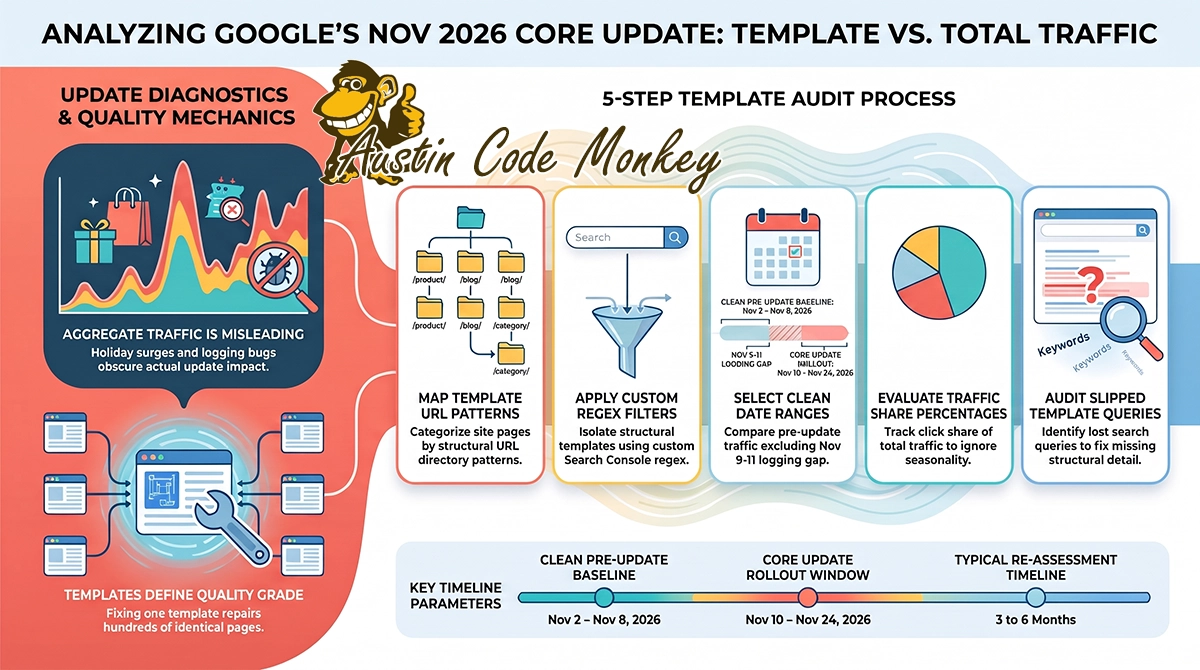
How to break your Search Console data out by template
Search Console’s Page filter accepts regular expressions, so you can isolate each template by its URL pattern in a couple of minutes.
- List your templates. Write down every page type and the URL pattern each one uses, such as
/service-areas/,/products/, or/blog/. - Filter by pattern. In the Performance report, add a Page filter, choose “Custom (regex),” and enter the pattern for one template.
- Pick clean dates. Use November 2 to 8 as your “before” week. That avoids the November 9 to 11 logging gap and stays ahead of the rollout. Wait for the “after” week until a full week has passed since Google marks the update complete.
- Compare share, not totals. For each template, divide its clicks by your site’s total clicks for the same week. If the holidays doubled everything, the share stays flat. If one template’s share falls while the others hold, that’s the update talking, not the season.
- Check the losers’ queries. Open the template that slipped and see which queries it lost. That usually points straight at the missing piece, whether it’s local detail, original photos, pricing, or an actual answer to the question.
What should you fix in a template that slipped?
Fix what the template is missing for a real visitor, and don’t change it until the rollout is finished.
Google tightened its guidance on AI-generated content on October 1, 2026. It now says, “It is critical to manually fact-check and review all AI-generated content for accuracy and trustworthiness before publishing.” For a content pipeline, that means human review has to be an actual step in the pipeline, not something someone does when they have time. Check whether the slipping template has a review step at all. Also check the author block. Google’s helpful content guidance warns against made-up authors and fake credentials, and templates are where a generic byline tends to get copied across hundreds of pages.
Then be patient. Google’s Gary Illyes has said at conferences that recovery from a core update usually takes three to six months, and can stretch longer if a site has to wait for the next core update. A good template fix in December may not show up until spring.
What this means for your business
If your site relies on AI-assisted or template-built pages, this update is a chance to find out which templates are earning their keep.
We’re working through the same thing on our own site. Our 34 city pages started cannibalizing each other because the template didn’t give each one a distinct job, so we rebuilt our /who-we-help/ section into a three-tier hub where every page has one purpose. Programmatic content only works if someone’s actively managing cannibalization and quality drift. That’s the part most AI content tools skip, and it’s most of what we actually do. If you want help splitting your data out by template and figuring out which one slipped, that’s what our AI content and programmatic SEO work at Austin Code Monkey covers. Nobody can promise how a core update treats your site, us included, but we can show you where the weak template is.
FAQ
When did the Google November 2026 core update start? Google began rolling out the November 2026 core update on November 10, 2026. Google says it applies to all languages and may take up to two weeks to finish.
How many core updates has Google released in 2026? The November 2026 core update is the third of the year. Google released the March 2026 core update (March 27 to April 8) and the May 2026 core update (May 21 to June 2) before it.
How should I measure the impact of a Google core update? Google recommends waiting at least a week after the update finishes and comparing that week to a week before it started. For template-built sites, comparing each template’s share of total clicks helps separate the update from seasonal swings.
Does Google require human review of AI-generated content? Google’s guidance, updated October 1, 2026, says it is critical to manually fact-check and review all AI-generated content for accuracy and trustworthiness before publishing. AI content isn’t banned, but unreviewed content is a risk.
How long does it take to recover from a core update? Google’s Gary Illyes has said recovery from a core update typically takes three to six months. It can take longer if a site needs to wait for the next core update to be reassessed.
Sources: Google Search Status Dashboard (November 2026 core update); Search Engine Journal coverage of the November 2026 core update; Google Search Central guidance on using generative AI content (updated October 1, 2026); Numinix November 2026 SEO news roundup (Search Console logging error, Gary Illyes recovery timelines).
Need Help With Your SEO?
The rules of local search are being rewritten in real time, and most businesses don’t find out until a competitor shows up in Gemini’s answer instead of them. Austin Code Monkey specializes in feeding the AI what it needs: business data that’s structured, verified, and descriptive enough for Gemini, ChatGPT, and Google’s AI Overviews to choose you over the competition.
Contact us today to run an AI Visibility Audit and see exactly how your business appears (or doesn’t) across ChatGPT and the other AI search tools your customers are already using.
Austin Code Monkey
Phone: (737) 932-7532
Hours: Monday – Friday, 10:00 AM – 10:00 PM
Website: https://austincodemonkey.com/
Get Started Today:
- Schedule your complimentary SEO audit
- Discover how SEO and AI Search Optimization can transform your business
Don’t let your competitors dominate your business in search queries. Partner with Austin’s leading SEO company and ensure your business appears when and where your customers are searching. Contact Austin Code Monkey today and take the first step toward complete digital dominance in the Austin market.