

Searching for “plumber near me” on Google Maps pulls up dozens of Austin businesses, but only three get the prime spots at the top—and those three capture most of the calls, directions requests, and new customers. Your ranking in that local 3-pack depends on factors you can actually control, from how you set up your Google Business Profile to how consistently your business information appears across Austin directories.

This guide walks through the specific ranking factors Google uses for Maps results, the optimization steps that move Austin businesses into top positions, and the review and citation strategies that build the prominence signals Google rewards.
From GBP optimization to local backlinks and AI readiness, this episode walks through Austin Code Monkey’s full roadmap to consistently rank in the Google Maps 3-pack. Perfect for any Austin business ready to own local traffic and beat the competition. Start dominating today at https://austincodemonkey.com!
Google Maps Ranking Factors for Austin in 2026
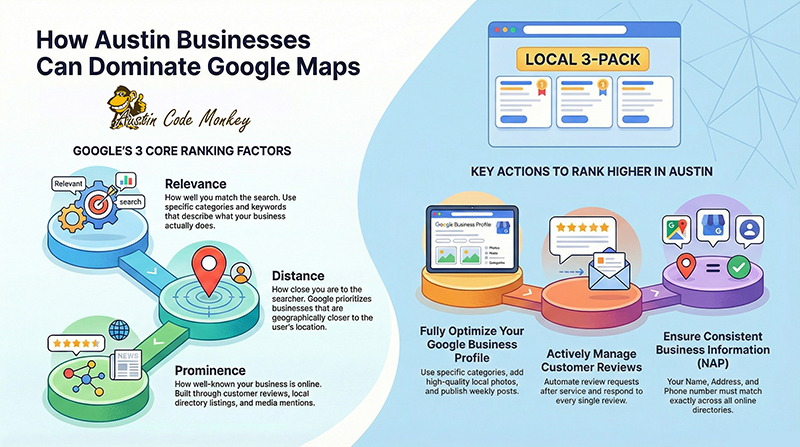
Google uses three core ranking factors—relevance, distance, and prominence—to decide which businesses appear in Maps results. Think of relevance as how well your business matches what someone’s searching for, distance as how close you are to the searcher, and prominence as how well-known and trusted your business is online.
Relevance measures whether your business profile actually matches the search query. A vegan taco truck in East Austin ranks higher for “vegan tacos East Austin” when the business category, description, and photos all clearly show vegan food. You can improve relevance by picking specific categories like “Vegan Restaurant” instead of just “Restaurant,” listing actual menu items or services people search for (breakfast tacos, queso, cold brew), and mentioning your neighborhood naturally in your business description.
Distance is straightforward—how far your business sits from the person searching or the location they typed in. A South Congress boutique will rank higher for “boutique South Congress” than for “boutique Domain” simply because of geography. If you run a service business that travels to customers, you can set service areas to show Google which neighborhoods you cover, like “Zilker, Travis Heights, and Bouldin Creek” rather than claiming you serve all of Texas.
Prominence represents your reputation and authority across the internet. An HVAC company with 500 recent reviews, mentions in the Austin American-Statesman, and a listing with the Austin Chamber will outrank a competitor with 20 reviews and no other online presence. You build prominence through customer reviews, getting listed on local directories, and earning links from Austin websites and news outlets.
Beyond the big three factors, Google now weighs how people interact with your listing. Higher click-through rates, more calls and direction requests, photo views, and engagement with your posts all signal that your business satisfies what searchers want. Google’s AI has also gotten better at understanding natural language, so someone searching “kid-friendly brunch near Zilker with patio” will see results that actually match all those details rather than just businesses with those exact keywords.
Why Ranking in the Local 3-Pack Matters to Austin Businesses
The local 3-pack refers to the three business listings that appear at the top of Google Maps results, above all other organic results. This prime real estate shows up on mobile screens with ratings, distance, and quick-action buttons for calling or getting directions.
Austin residents often make decisions based on reviews and how close a business is, especially during events like SXSW or ACL Fest when they’re searching on the go. One tap on a phone number or directions button converts someone from browsing to customer in seconds. Showing up consistently in the 3-pack also means you spend less on ads and create a barrier that makes it harder for new competitors to take your customers.
Step-By-Step Google Business Profile Optimization for 2026
Your Google Business Profile (formerly Google My Business) controls how you appear in Maps results. Each optimization step directly improves your chances of ranking higher.
1. Claim and Verify Your Profile
Go to google.com/business and search for your business name. If a profile already exists, you can request access. If not, you’ll create a new one from scratch.
Google verifies businesses through postcards mailed to your address (most common), phone calls, email, video verification, or through Google Search Console if your website is already verified. Only verified profiles show up in the local 3-pack, so this step isn’t optional—it’s the foundation everything else builds on.
2. Choose the Best Primary and Secondary Categories
Your primary category tells Google what your business fundamentally does—”Personal Injury Attorney,” “Mexican Restaurant,” “Dog Groomer.” Secondary categories let you add more specific services like “Criminal Justice Attorney,” “Breakfast Restaurant,” or “Pet Boarding Service.”
Look at what categories your top Austin competitors use by viewing their profiles. Pick categories that match the actual searches people type, not just what sounds good. A coffee shop that also sells pastries might use “Coffee Shop” as primary and “Bakery” as secondary. Adding irrelevant categories to try to rank for more searches actually confuses Google and hurts your relevance score.
3. Craft a Keyword-Rich Austin Description
Write 2–3 short paragraphs describing what you do, who you serve, and where in Austin you operate. Mention specific neighborhoods like “We serve South Congress, Zilker, and Travis Heights with same-day AC repair” rather than just saying “Austin area.”
Include details that matter to Austin customers—pet-friendly patios, live music, eco-friendly products, parking availability. However, repeating “Austin” in every sentence or making claims like “#1 in Texas” without proof will make your description sound spammy rather than helpful.
4. Upload Geotagged High-Quality Photos and Videos
Use clear, well-lit photos that are at least 1200 pixels on the longest side. Include shots of your storefront with visible signage so people can recognize your building, interior photos showing your space and atmosphere, team photos that build trust, and product or menu images.
Short videos between 15–30 seconds work particularly well—quick tours, behind-the-scenes clips, or demonstrations of your work. While adding location data to your photo files (geotagging) doesn’t directly boost rankings, regularly uploading new photos with captions that mention your Austin location correlates with better engagement, which Google does track.
5. Publish Weekly Posts and Product Updates
Google Posts work like mini social media updates on your profile. Use them for weekly specials, event tie-ins during SXSW or ACL Fest, new menu items, or seasonal services like cedar fever relief or A/C tune-ups.
Try posts like “Weekend patio brunch special in Zilker” or “Free delivery in East Austin this week.” Regular posting signals to Google that your business is active and current, which matters because outdated information frustrates searchers.
6. Monitor the Q&A and Messages Tab
The Q&A section on your profile lets anyone ask questions publicly. You can seed this section yourself by posting common questions and answering them—parking options, whether you’re pet-friendly, typical turnaround times.
Enable messaging and respond quickly, ideally within minutes during business hours. Set up saved replies for common questions so you can respond fast even when you’re busy. Quick, helpful responses improve engagement metrics and convert more browsers into customers.
Austin-Focused Keyword and Category Research
Austin residents search using neighborhood names and local landmarks, not just “Austin.” Someone looking for vintage clothing might search “North Loop vintage” or “SoCo boutique” rather than “Austin vintage clothing.”
Popular neighborhoods to mention include South Congress (SoCo), South Lamar (SoLa), Zilker, East Austin, Hyde Park, Mueller, The Domain, Rainey Street, and Barton Hills. Surrounding cities like Round Rock, Cedar Park, and Pflugerville also matter if you serve those areas.
For service businesses that travel to customers, list the specific neighborhoods you actually serve rather than claiming all of Austin. Use intent-driven phrases like “emergency plumber Zilker” or “mobile notary South Congress” that match how people search when they need help right now.
Proven Review Strategies That Boost Prominence
Reviews influence all three ranking factors—they prove relevance through specific mentions of your services, often include location details, and directly build prominence. Recent reviews matter more than old ones, and detailed reviews outperform generic “great service” comments.
1. Automate Review Requests at Point of Service
Ask for reviews right after someone has a positive experience—at checkout, when you finish a job, or when they pick up their order. The timing matters because people are most willing to help when they’re satisfied.
Use QR codes at your register, send text messages with review links, or include review buttons in follow-up emails. A simple request works: “Thanks for stopping by! Mind leaving a quick review about your experience? It helps other Austin locals find us.”
2. Respond to Every Review Within 24 Hours
Responding to reviews shows potential customers that you care about feedback and encourages more people to leave reviews in the future. For positive reviews, thank the reviewer by name and mention something specific: “Thanks, Sarah! Glad you enjoyed the tacos on our South Congress patio.”
For mixed or negative reviews, acknowledge the issue and offer to fix it: “Sorry about the wait time, Mike. That’s not typical for our East Austin location. Please message us so we can make it right.” Reference specific details rather than using the same generic response for everyone.
3. Highlight Austin-Specific Mentions in Replies
When someone mentions a local event or landmark in their review, reference it in your response: “Thanks for choosing us before the UT game!” or “Glad our patio worked for your ACL pre-party.” These local references reinforce your connection to Austin and may help Google better understand your local relevance.
Consistent NAP and Austin Citation Sources
NAP stands for Name, Address, and Phone number. Google checks whether your business information matches across different websites, and inconsistencies create doubt about which details are correct.
Check your NAP on major platforms first:
- Google Business Profile
- Apple Maps
- Bing Places
- Yelp
Even small differences like “Street” versus “St.” or different phone number formats can create confusion. Search for old addresses or previous phone numbers you might have used and update or remove those outdated listings.
Austin-specific directories that carry extra weight include the Austin Chamber of Commerce, Austin Independent Business Alliance, Visit Austin, Austin Chronicle directory, and Community Impact. Complete your full profile on each site with photos, descriptions, and matching NAP details.
Local Link-Building and Authority Signals
Links from other Austin websites back to yours signal to Google that you’re genuinely part of the local community. Focus on authentic partnerships rather than trying to game the system with low-quality directory links.
Sponsor local events like the Austin Marathon, Pecan Street Festival, or Keep Austin Beautiful initiatives. Offer in-kind donations, provide scholarships, or host community cleanups. Most sponsors receive a link from the event website, which helps your prominence.
Pitch stories to Austin media outlets like the Austin American-Statesman, Austin Chronicle, Community Impact, or KUT. Story angles that work include unique data you’ve collected (like cedar allergy trends if you’re a clinic), sustainability initiatives, hiring local veterans, or collaborations with Austin artists. Send short, specific pitches with professional photos ready to use.
Website and Schema Tweaks That Support Maps Rankings
Your website backs up the information in your Google Business Profile and captures people who want to learn more before calling.
Add LocalBusiness schema markup to your website—this is code that tells search engines exactly what your business is, where it’s located, and when it’s open. The schema includes your business type, name, address, phone, hours, coordinates, and links to your social profiles. You can generate this code using Google’s Structured Data Markup Helper or hire a developer to add it.
Create separate pages for each location if you have multiple spots, and create dedicated pages for each major service you offer. Each location page gets its own NAP, embedded Google Map, parking instructions, and neighborhood-specific content. Link between related service pages and neighborhood pages so visitors can easily find what they’re looking for.
Tracking Tools and KPIs for Google Maps Success
Track specific metrics so you know what’s working rather than guessing. Tools like BrightLocal, Whitespark, and Local Falcon show where you rank in the local 3-pack for different searches and neighborhoods.
Google Business Profile Insights shows how many people called you, clicked to your website, requested directions, or sent messages. You can see how many times your photos were viewed compared to competitors and whether people found you through direct searches for your name or discovery searches for your category.
Add UTM parameters to your Google Business Profile website link so Google Analytics can track exactly how much traffic comes from Maps. If you use call tracking software like CallRail, keep your primary phone number consistent on your Google profile—tracking numbers work better on your website than in your NAP listings.
Future-Proofing Against AI-Driven SERP Changes
Voice assistants and AI overviews prefer concise, clear answers they can read aloud or summarize. Structure your content to work well for both human readers and AI systems.
Build FAQ sections that answer specific local questions like “What’s the best time to visit your South Congress patio?” or “Do you offer after-hours locksmith service in East Austin?” Write answers in plain language using short sentences that voice assistants can easily parse.
Keep your hours, pricing ranges, menus, and inventory accurate and up to date. AI systems pull from multiple sources to generate answers, so consistent, current information across your website and profile helps you show up in AI-generated summaries.
Ready to Outrank Austin Competitors? Let’s Talk Strategy
Ranking higher in Google Maps comes down to matching searches precisely (relevance), being close to searchers (distance), and building trust across the web (prominence). Regular posts, quick responses, and steady reviews keep your engagement signals strong.
For help creating a customized local SEO strategy tailored to your Austin business, reach out to Austin Code Monkey to discuss your specific goals and competitive landscape.

FAQs About Google Maps Rankings for Austin Businesses
How long does it take for Austin businesses to see Google Maps ranking improvements?
Most businesses see initial changes within four to six weeks after implementing optimization strategies. However, reaching the top spots in competitive categories typically takes several months of consistent work. Your timeline depends on how competitive your category is, how many reviews you’re starting with, and how accurate your existing citations are.
What should Austin business owners do if their Google Business Profile gets suspended?
Contact Google Business Profile support immediately to find out why your profile was suspended. Common reasons include operating from a home address without proper documentation, adding keywords to your business name field, or violating service area guidelines. Follow Google’s reinstatement process, which usually involves proving your business is legitimate and fixing whatever violated their policies.
How can Austin businesses report competitors who keyword stuff their business names?
Click “Suggest an edit” on the competitor’s Google Business Profile and report that their business name violates Google’s guidelines. You can also submit feedback directly to Google explaining the violation. Google prohibits including keywords, service areas, or marketing phrases in the business name field unless those terms appear in your actual registered business name.
Ready to Dominate Google Map Rankings in Austin?
Call Austin Code Monkey Today!
Hours: Monday – Friday, 10:00 AM – 10:00 PM
Visit https://austincodemonkey.com/ to learn more about our comprehensive SEO services, and discover why Austin Code Monkey is your Austin SEO Company.
Your competitors are already investing in SEO. Don’t fall behind—partner with Austin Code Monkey and start capturing more customers searching for SEO for small business Austin services today. We’re ready to help your home services business thrive in the competitive Austin market through strategic search engine optimization and professional graphic design services.